

Introduction
Artificial intelligence no longer belongs only to research labs and large tech companies. Today, businesses use machine learning to automate decisions, detect fraud, personalize experiences, and improve operations. As AI adoption grows, companies need tools that simplify development without slowing innovation. That demand has pushed modern AI development platforms into the spotlight.
An ML development environment gives teams one place to build, train, test, deploy, and monitor AI models. Instead of juggling disconnected tools, developers and data scientists can manage the full workflow inside a unified environment. Modern platforms now include AutoML, GPU-powered training, collaboration features, deployment pipelines, and real-time monitoring.
Platforms such as Microsoft Azure Machine Learning Studio, Google Vertex AI, and Amazon SageMaker Studio continue to reshape how teams handle AI development. Businesses can now build production-ready AI models faster while reducing infrastructure complexity and operational costs.
What Is a Machine Learning Studio?
A machine learning studio acts as a centralized development environment for AI projects. It combines data preparation, model training, experimentation, deployment, and monitoring into a single workspace.
Traditional machine learning workflows often require separate tools for coding, infrastructure management, collaboration, and deployment. ML studios remove much of that friction. Teams can experiment with models, manage datasets, and deploy APIs without building every workflow from scratch.
Most modern AI development platforms support both code-first and no-code development. Experienced engineers can work directly with frameworks like TensorFlow or PyTorch, while non-technical users can rely on drag-and-drop interfaces and AutoML features.
Core Components of an ML Studio
Most machine learning studios include several essential components:
| Component | Purpose |
| Data Workspace | Stores datasets, notebooks, and experiments |
| Model Training Tools | Trains machine learning and deep learning models |
| Deployment Pipelines | Pushes models into production environments |
| Monitoring Systems | Tracks accuracy, drift, and performance |
These components work together to support the full machine learning lifecycle.
How ML Studios Simplifies AI Development
ML Studios reduce technical overhead by automating repetitive tasks. Instead of configuring servers manually or writing deployment scripts from scratch, teams can use built-in workflows.
For example, a retail company can upload customer data, train a recommendation engine, deploy it as an API, and monitor performance from one dashboard. That streamlined workflow saves time and reduces operational complexity.
Many platforms also integrate directly with Jupyter Notebook environments, cloud storage systems, and CI/CD pipelines. Those integrations improve productivity and reduce setup time for development teams.
Who Uses Machine Learning Studios?
Modern AI development platforms support a wide range of users:
- Data scientists building predictive models
- ML engineers deploying production systems
- Business analysts using AutoML tools
- Enterprises managing large-scale AI operations
Healthcare companies use them for predictive diagnostics. Financial firms rely on them for fraud detection. E-commerce brands use them to personalize recommendations and forecast customer behavior.
How Machine Learning Studios Work
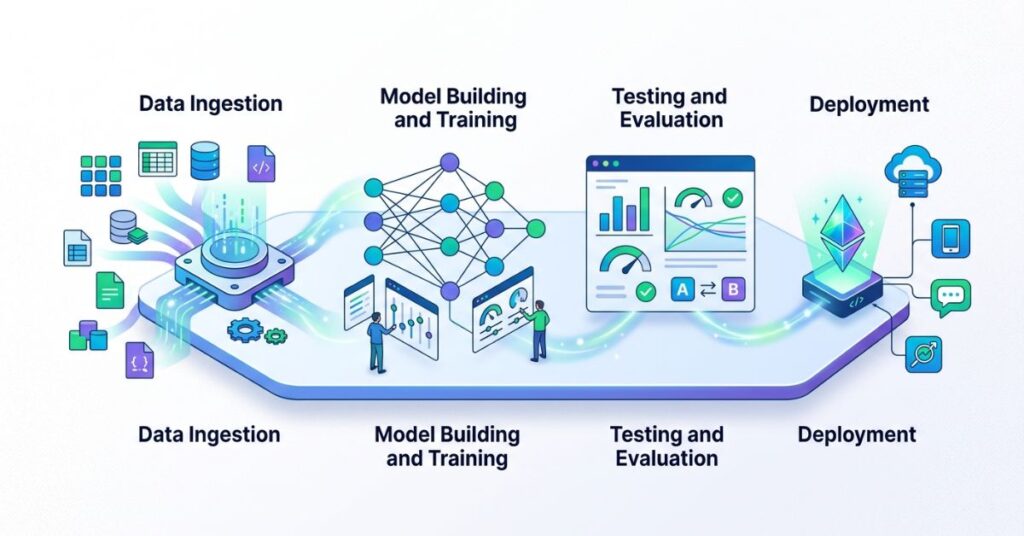
Most ML platforms follow a structured workflow that moves from raw data to deployed AI models.
Data Preparation and Integration
Every machine learning project starts with data. Teams collect information from databases, APIs, cloud storage, or business applications. The studio then helps users clean, organize, and transform that data.
Good data preparation improves model performance dramatically. Even advanced algorithms struggle when datasets contain duplicates, missing values, or inconsistent formatting.
Most platforms now support automated preprocessing features, including:
- Missing value detection
- Feature engineering
- Data normalization
- Dataset labeling
These features help teams reduce manual effort during early-stage development.
Model Training and Experimentation
Once the data becomes usable, developers begin training models. ML studios allow users to test multiple algorithms, tune hyperparameters, and compare results in real time.
Teams can experiment with:
- Regression models
- Classification systems
- Neural networks
- Deep learning architectures
Modern platforms also provide GPU-powered training environments for large datasets and complex models.
Automated Machine Learning (AutoML)
As machine learning workflows become more complex, AutoML has emerged as one of the biggest reasons companies adopt ML studios.
f(x)=argmaxm∈MPerformance(m,D)
This formula represents how AutoML selects the best-performing model from multiple candidates.
AutoML systems automatically test algorithms, optimize hyperparameters, and identify the best-performing models. That process allows smaller teams to build AI solutions without deep machine learning expertise.
Businesses often use AutoML for:
- Sales forecasting
- Churn prediction
- Demand planning
- Customer segmentation
AutoML accelerates experimentation, but teams should still validate outputs carefully before deployment.
Model Deployment and Monitoring
A model only creates value after deployment. ML studios simplify deployment through APIs, containerization, and cloud-based serving environments.
After deployment, monitoring tools track:
| Monitoring Area | Why It Matters |
| Accuracy Drift | Detects declining prediction quality |
| Latency | Measures response speed |
| Resource Usage | Tracks infrastructure efficiency |
| Bias Detection | Identifies fairness issues |
Continuous monitoring helps teams retrain models before performance drops significantly.
Collaboration and MLOps Features
Modern AI projects involve developers, analysts, engineers, and compliance teams. ML studios improve collaboration by centralizing workflows and version control.
Many platforms now include MLOps features such as:
- Experiment tracking
- Automated retraining
- CI/CD integration
- Model versioning
- Approval workflows
These capabilities help enterprises scale AI projects more effectively.
Key Benefits of Using a Machine Learning Studio
Modern AI workflow platforms offer more than convenience. They improve speed, scalability, and operational control across AI projects.
Faster Model Development
Centralized tools reduce setup time and eliminate unnecessary workflow bottlenecks. Teams spend more time improving models and less time managing infrastructure.
Developers can launch experiments quickly, compare results instantly, and deploy models without switching between multiple environments.
Lower Infrastructure Complexity
Managing AI infrastructure manually can become expensive and time-consuming. ML studios simplify infrastructure management by handling provisioning, scaling, and orchestration automatically.
Cloud-based platforms especially reduce the burden on internal IT teams.
Improved Team Collaboration
Data scientists, engineers, and business teams often struggle with disconnected workflows. Centralized ML environments solve that problem by creating shared workspaces. Shared dashboards, experiment logs, and deployment histories help teams stay aligned throughout the project lifecycle.
Scalable AI Workflows
Many startups begin with simple predictive models, but their AI projects usually expand quickly as business demands increase. ML studios support scalable workflows that handle increasing data volumes and deployment demands.
Cloud-native platforms also support distributed training for massive datasets.
Better Governance and Security
Enterprises must protect sensitive data and maintain compliance standards. Modern ML studios include role-based access controls, audit logs, and governance policies.
Those features become especially important in industries such as healthcare, banking, and insurance.
Recommended: Best Spotify Machine Learning Projects for Beginners & Experts
Top Machine Learning Studio Platforms Compared
Several platforms dominate the machine learning studio market, but each one serves different use cases.

Microsoft Azure Machine Learning Studio
Microsoft Azure Machine Learning Studio focuses heavily on enterprise AI workflows. It integrates well with Microsoft ecosystems and supports both code-first and no-code development.
Key strengths include:
- Strong MLOps integration
- Enterprise-grade security
- AutoML capabilities
- Easy deployment pipelines
Large organizations often choose Azure because of its governance and compliance features.
Google Vertex AI
Google Vertex AI combines Google’s AI infrastructure with advanced automation tools. It performs especially well for deep learning and large-scale experimentation.
The platform supports TensorFlow development, distributed training, and integrated data pipelines.
Teams that already use Google Cloud services often prefer Vertex AI because of its native integrations.
Amazon SageMaker Studio
Amazon SageMaker Studio offers a highly flexible environment for machine learning experimentation and deployment.
It supports:
- Notebook-based workflows
- Managed training infrastructure
- Real-time inference
- Automated model tuning
Many startups and cloud-native companies rely on SageMaker because of its scalability.
Open-Source ML Studio Alternatives
Not every company wants a fully managed cloud platform. Some teams prefer open-source alternatives for customization and cost control.
Popular options include:
- MLflow
- Kubeflow
- Dataiku
- H2O.ai
Open-source platforms provide flexibility, but they usually require more technical expertise.
Which Platform Fits Your Use Case?
The right platform depends on business goals, technical expertise, and infrastructure needs.
| Platform | Best For |
| Azure ML Studio | Enterprise governance and compliance |
| Google Vertex AI | Deep learning and scalable experimentation |
| SageMaker Studio | Flexible cloud-native AI development |
Smaller teams may prioritize simplicity and AutoML features, while enterprises often focus on governance and deployment scalability.
Real-World Machine Learning Studio Use Cases
AI development platforms now power intelligent systems across nearly every industry.
Healthcare Predictive Analytics
Hospitals use machine learning studios to predict patient risks, optimize staffing, and improve diagnostics.
Predictive analytics models can identify high-risk patients earlier, allowing healthcare teams to intervene before conditions worsen.
Fraud Detection in Financial Services
Banks and fintech companies rely heavily on AI to detect suspicious transactions.
Machine learning models analyze transaction patterns in real time and flag unusual activity instantly. ML studios simplify deployment and monitoring for those systems.
Recommendation Engines for E-Commerce
Recommendation systems drive engagement and sales for online retailers.
AI models analyze browsing behavior, purchase history, and product preferences to generate personalized recommendations.
Companies like Amazon and Netflix have demonstrated how powerful recommendation systems can become.
Customer Churn Prediction
Subscription-based businesses often use churn prediction models to identify customers likely to leave. Marketing teams can then launch retention campaigns before customers cancel services.
Computer Vision and NLP Projects
Modern ML environments also support advanced AI workloads such as:
- Image recognition
- Object detection
- Sentiment analysis
- Chatbots
- Language translation
GPU-powered infrastructure makes these projects far more accessible than before.
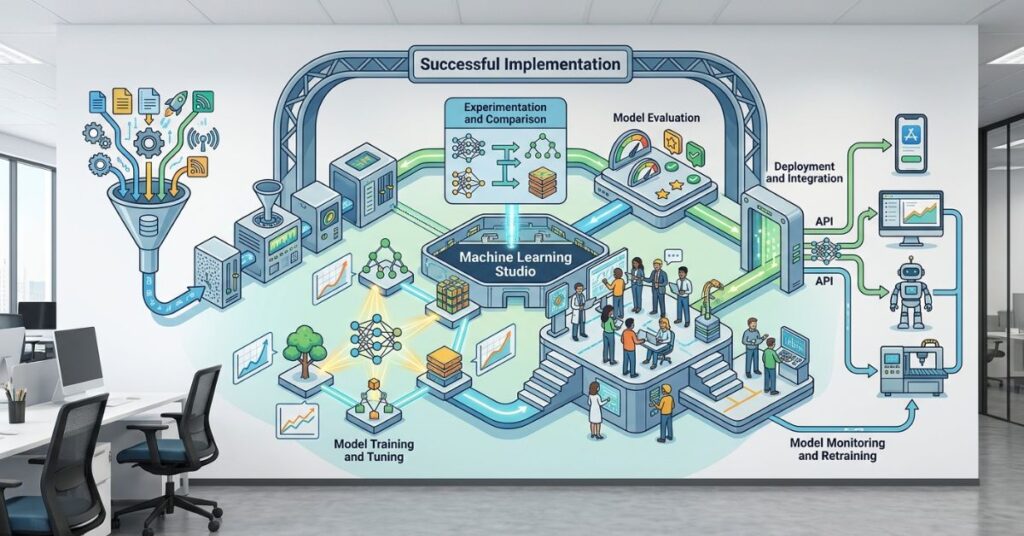
How to Implement a Machine Learning Studio Successfully
Technology alone does not guarantee successful AI adoption. Companies need a clear implementation strategy.
Define Business Objectives First
Many organizations rush into AI without identifying measurable goals. Successful projects begin with a clear business problem.
For example:
- Reduce fraud losses
- Improve forecasting accuracy
- Increase customer retention
- Automate support workflows
Clear objectives help teams choose the right models and success metrics.
Choose the Right Infrastructure
Infrastructure decisions affect scalability, performance, and cost.
Cloud-based AI platforms work well for most organizations because they offer flexibility and managed services. However, some enterprises still require on-premise environments for compliance reasons.
Build a Scalable ML Workflow
A scalable workflow should support:
- Continuous experimentation
- Automated retraining
- Version control
- Monitoring pipelines
Many teams now adopt structured frameworks such as the TRAIN methodology:
- Target the business problem
- Refine datasets
- Automate experimentation
- Integrate deployment pipelines
- Normalize monitoring and retraining
That framework helps organizations maintain consistency across AI projects.
Create Governance and Compliance Policies
AI systems must follow ethical and regulatory standards.
Organizations should establish policies for:
- Data privacy
- Model transparency
- Bias mitigation
- Access control
- Audit logging
Strong governance reduces legal and operational risks.
Monitor Models Continuously
Model performance changes over time. Customer behavior evolves, datasets shift, and prediction accuracy declines.
Continuous monitoring helps teams detect issues early and retrain models before business performance suffers.
Common Mistakes Teams Make With ML Studios
Even advanced AI environments cannot fix poor strategy or weak execution.
Relying Too Heavily on AutoML
AutoML simplifies development, but it should not replace human oversight.
Teams still need to validate datasets, interpret outputs, and review ethical risks carefully.
Poor Collaboration Between Teams
AI projects often fail because technical and business teams operate separately.
Successful organizations encourage collaboration between engineers, analysts, compliance officers, and decision-makers from the beginning.
Expert Tips and Best Practices for ML Studio Optimization
Experienced AI teams follow several best practices to improve performance and reduce operational costs.

Reduce Training Costs Efficiently
GPU resources can become expensive quickly.
Teams can lower costs by:
- Using smaller datasets during experimentation
- Scheduling training jobs strategically
- Shutting down idle resources
- Using distributed training only when necessary
Cost optimization becomes especially important for large-scale deep learning projects.
Improve Model Accuracy With Better Data
Better data usually improves performance more than complex algorithms.
Teams should focus on:
- Balanced datasets
- Feature engineering
- Removing duplicate records
- Reducing noise in training data
Strong data pipelines often produce better outcomes than aggressive model tuning.
Use MLOps for Faster Deployment
MLOps practices streamline deployment and reduce operational bottlenecks.
Automated pipelines help teams move models from experimentation to production faster while reducing human error.
Automate Repetitive AI Tasks
Automation improves consistency and productivity.
Many AI workflow systems now automate:
- Data preprocessing
- Experiment tracking
- Hyperparameter tuning
- Model retraining
- Deployment workflows
Automation allows teams to focus on strategy and innovation instead of repetitive maintenance tasks.
Strengthen Security and Compliance
AI systems frequently handle sensitive customer information and critical business data.
Organizations should implement:
- Encryption standards
- Access controls
- Audit trails
- Bias testing
- Compliance reviews
Security should remain part of every development phase rather than an afterthought.
Frequently Asked Questions
What Is the Difference Between AutoML and ML Studio?
AutoML automates model selection and optimization, while a machine learning studio provides a complete environment for building, deploying, monitoring, and managing AI workflows.
Can Beginners Use Machine Learning Studios?
Yes. Many platforms include drag-and-drop interfaces, guided workflows, and no-code tools designed for beginners. However, technical expertise still helps teams manage advanced AI projects more effectively.
Which ML Studio Works Best for Enterprises?
Large enterprises often prefer Azure Machine Learning Studio because of its governance, security, and MLOps capabilities. However, the best platform depends on infrastructure needs and business goals.
How Much Does a Machine Learning Studio Cost?
Costs vary based on compute usage, storage, deployment traffic, and GPU resources. Cloud platforms typically use pay-as-you-go pricing models.
Do ML Studios Support Deep Learning?
Yes. Most modern ML studios support deep learning frameworks such as TensorFlow and PyTorch, along with GPU-powered training infrastructure.
Conclusion
Modern AI development environments have transformed how organizations build and deploy AI systems. Instead of managing fragmented workflows, teams can now handle experimentation, deployment, monitoring, and collaboration from one unified platform.
As AI adoption continues to grow, businesses need scalable and efficient development environments more than ever. Platforms such as Azure Machine Learning Studio, Google Vertex AI, and Amazon SageMaker Studio help companies accelerate development while improving governance and operational control.
Success, however, depends on more than technology alone. Organizations must define clear business objectives, maintain high-quality data, monitor models continuously, and create scalable workflows that support long-term growth.
Companies that combine strong strategy with scalable AI infrastructure will gain a major advantage in the evolving AI landscape.
Related AI Articles: Generative AI for Research: Smarter Academic Workflows Guide

Qasim Ali is a Lead AI Solutions Architect and the founder of TechyPulse, with over 12 years of experience in enterprise digital transformation. Holding an MSc in Computer Science, he specializes in making Artificial Intelligence, Cybersecurity, and Machine Learning accessible and scalable. Qasim is dedicated to decoding complex neural networks into actionable insights for the modern technical landscape.